

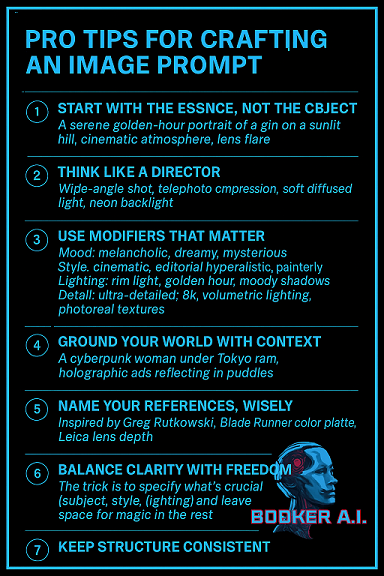
This guide expands each of the seven pro tips into practical, actionable guidance for crafting image prompts that produce richer, more intentional visuals. Each paragraph focuses on a single idea or technique so you can apply it directly when briefing photographers, artists, or image-generation tools. Read each short section as a standalone improvement you can test immediately.
Essence
Define the subject by its core identity rather than surface details. Start prompts with a single, focused phrase that captures what the image must communicate above all else, such as “resilient elder gardener” or “futuristic commuter hub”. This acting-like anchor prevents drift toward irrelevant elements and keeps all subsequent descriptors aligned with the central idea.
Use sensory verbs and emotional adjectives to convey the felt quality of the subject. Words like weathered, gleaming, quietly joyful, or tense transmit mood and texture as efficiently as visual descriptors. When you name the essence, follow it with one crisp line that sets the intended emotional weight for every choice after that.
Directing
Think like a director and stage the scene with intention rather than listing random details. Specify camera angles, framing, and action cues such as “low-angle portrait, subject looking off-frame, hand on a rusted rail” to create narrative and energy. Treat the prompt as a shot list: who, what, where, when, and why to guide composition and interaction.
Give direction for movement and timing to capture transient feelings or gestures. Include cues for implied motion like “wind-swept hair”, “mid-step”, or “sun flare at golden hour” to inject naturalism and life. Use directing cues to control pacing and to force a moment that tells a story rather than a static catalog of objects.
Follow visual hierarchy rules in your direction to make the subject dominant. State which elements must read first, second, and third using simple language such as “subject prominent; background blurred; foreground soft vignette.” This prevents compositions where competing details dilute the impact.
Modifiers
Choose modifiers that describe quality not just appearance, using words like textured, soft-focus, cinematic, high-contrast, painterly, or hyperreal. Modifiers shape tone and finish, and choosing them deliberately turns a bland description into a stylistic instruction. Stack two to three complementary modifiers to create a clear aesthetic direction without overconstraining the result.
Prioritize modifiers that resolve common ambiguities: specify the type of lighting rather than just “dramatic,” for example “rim-lit”, “diffused overcast”, or “neon-saturated.” This reduces interpretation variance and keeps output consistent across iterations. When experimenting, swap a single modifier to judge its effect and learn which words reliably produce the look you want.
Grounding
Ground scenes with tangible context that explains why objects exist in the frame by adding functional clues like “cafeteria table with scattered receipts”, “studio wall with taped references”, or “subway tile stained with age.” Context anchors meaning and gives viewers cues for interpreting the subject. Concrete, small details build believability in both photographic and AI-generated scenes.
Use time and weather to further anchor the image and to influence color, shadow, and atmosphere. Specify “dawn mist”, “late afternoon heat haze”, or “rain-slick streets under sodium lights” to shape palette and texture. When grounded properly, images feel lived-in and purposeful rather than staged or generic.
References
Name specific visual references to communicate a complex aesthetic quickly: artists, film titles, photographers, architectural styles, or iconic objects serve as shorthand. Use references like “in the style of Dorothea Lange”, “Blade Runner neon noir”, or “mid-century modern interiors” to transmit a rich set of visual rules with one phrase. Choose references the collaborator or tool understands to maximize alignment.
When you can’t rely on a shared reference, describe the reference attributes instead: “high-grain black-and-white reportage; shallow depth of field; candid expression.” This translation step creates an accessible substitute for niche references and preserves the desired look. Provide one or two references only to avoid mixed directions and to keep the visual DNA coherent.

Clarity and Freedom
Balance specificity and openness by locking the non-negotiables and leaving creative freedom for secondary elements. Identify three must-haves that the final image must include, then append a short clause like “other elements open to artistic interpretation” to invite variation. This approach secures critical outcomes while allowing serendipity and refinement.
Order your prompt so constraints appear early and optional, exploratory language follows. Begin with the subject, essential modifiers, and technical constraints, then finish with mood notes and optional extras. This signal hierarchy prevents creative engines or collaborators from prioritizing minor optional details over core requirements.
Use iterative feedback loops to refine where to be strict and where to be loose. Run a few variations with one variable changed, review which elements are consistently important, and then tighten or loosen the prompt accordingly. Iteration reveals which freedoms produce valuable surprises and which create unacceptable variance.
Structure
Keep prompt structure consistent across projects so you build repeatable results and a personal prompt library. Use a predictable order such as subject → essential modifiers → camera/lighting → grounding/context → references → optional flourishes to speed writing and to make prompts machine-friendly. Consistency transforms ad-hoc descriptions into templates you can optimize over time.
Standardize vocabulary and phrasing to reduce ambiguity and to train collaborators or tools on your style. Maintain a short glossary of preferred modifiers, camera terms, and reference names to reuse across prompts. A consistent structure makes it easier to scale prompt creation, compare iterations, and onboard others to your visual language.
Conclusion
Apply these seven expanded practices in small experiments and log what works so you build a catalog of reliable prompts and modifiers. Treat prompts as living templates: refine, prune, and repurpose the lines that consistently produce your desired visuals. With focused essence, directing intent, purposeful modifiers, grounded context, clear references, balanced constraints, and consistent structure you turn vague ideas into compelling, repeatable images.
Larry Booker – Sr. Prompt Engineer
BOOKER A.I.